About How to fix damaged app message on macOS
Apple has tightened up the Gatekeeper security in its latest operating system and one very visible change is that the option to allow apps from unidentified developers is no longer there.
How to fix damaged app message on macOS Sierra or later
To resolve Gatekeeper issues on macOS Sierra and unlock images and programs ( annoying image/application is damaged messages pretending you cannot open things ).
For that reason you might have to completely disable Gatekeeper checks, and to do that open your terminal and type:
sudo spctl --master-disable
**Enter your password and you’re done. Note that there are two (2) dashes before master. You might miss that while copy/pasting. So I will leave a screenshot below. I would suggest you type the command manually.
To verify that your operation was successful you need to Open Settings and verify that the Anywhere option is now visible as shown below.
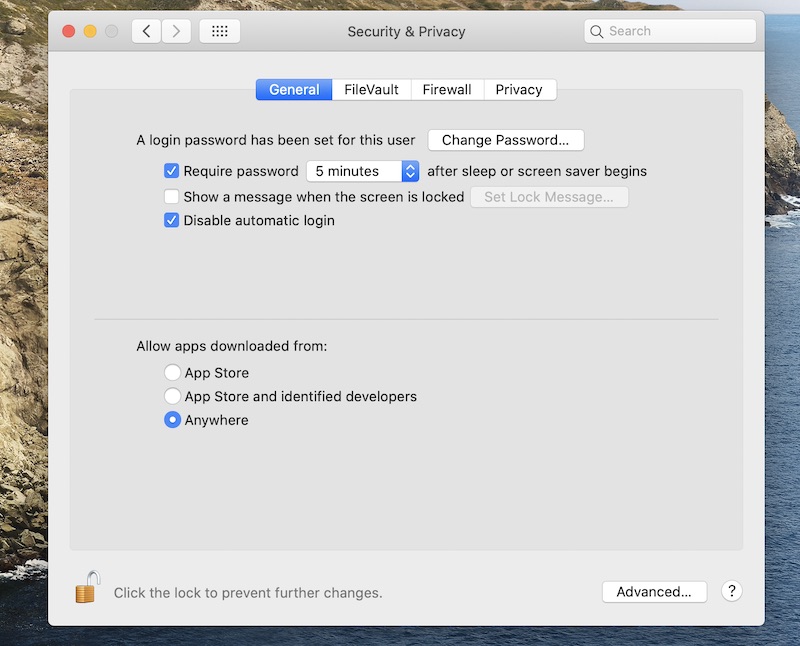
Revert the Gatekeeper Settings
To enable Gatekeeper again, enter the following command (notice two dashes before ‘master’).
sudo spctl --master-enable
This option will allow you to bypass Quarantine for a specific application. Note that the command includes the path to the application, or image (.dmg)."
1. Launch the Terminal utility.
This is a standard utility that does not need to be installed additionally. Terminal can be found through Spotlight.
2. Use the command: sudo xattr -r -c Put a space and drag the damaged program into the Terminal window. The command will be added.
Important! The command does not work on files in the image (.dmg). You need to copy the damaged program, for example, to the desktop, and apply the command to it. In some cases, the command can be applied to the image (.dmg) before mounting.
3. Press Enter and enter the Administrator password.
The password is not displayed when entered in the Terminal, but is entered.
If the password is not set, create it.
4. Proceed to launch the damaged program.
Wait for the scan to complete and you will be able to Open it.
The scan may take up to 30 minutes.