The Best AI Agents for Mac in 2026: What They Can Do and What They Cost
The Mac is becoming more than a computer for browsing the web, writing documents, and running development tools. It is increasingly becoming a place where AI agents can do useful work.
A new generation of tools can read files, operate applications, browse websites, write and execute code, research information, create documents, and complete multi-step tasks with limited supervision. Some run as native macOS applications. Others use a persistent cloud computer that keeps working after you close your laptop. Open-source projects let you build an agent around the models and infrastructure you choose.
This comprehensive guide examines 13 AI agents and agent platforms that Mac users should know about in November 2026. It covers general work and study, persistent computer agents, software development, and open-source alternatives—including real-world subscription costs and API expenses.
1. What Makes an AI Agent Different?
A traditional chatbot answers questions. An AI agent can take a goal, break it into steps, use tools, interact with files and applications, and work toward completing the task.
For example, instead of asking an AI how to prepare a market research report, you could ask an agent to:
- Search the web for relevant companies and market data.
- Read documents in a project folder.
- Compare competitors and summarize the findings.
- Build a spreadsheet.
- Draft a report or presentation.
- Save the finished files in the right place.
The distinction is that the agent performs the work rather than simply explaining how you could do it.
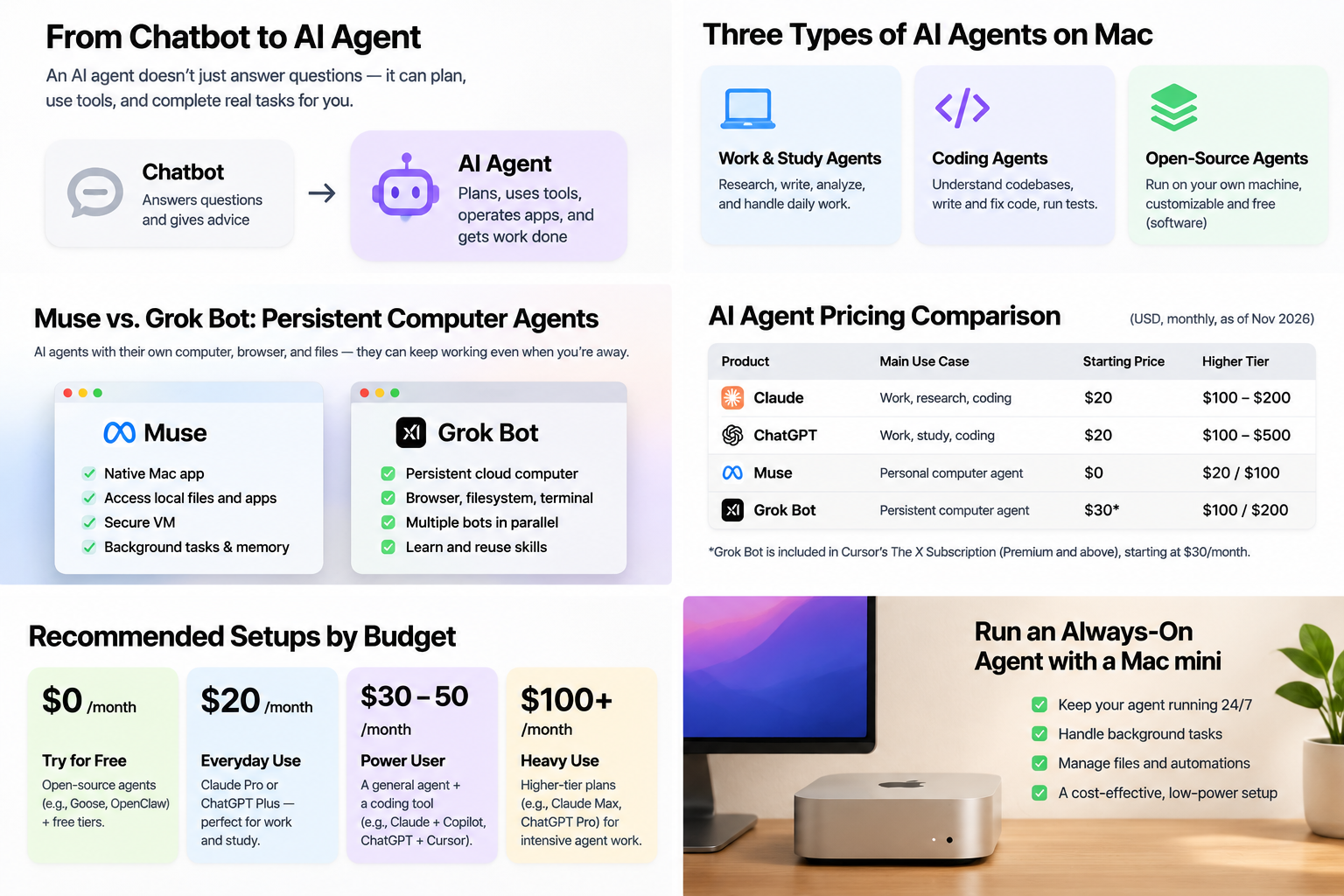
Four Distinct Approaches to Agent Design:
- Desktop agents work directly with your Mac, local files, and connected applications.
- Persistent computer agents run on a dedicated cloud computer with an autonomous browser, filesystem, and terminal.
- Coding agents focus on software projects, multi-file code modifications, test execution, and self-healing pipelines.
- Self-hosted agents run on your own Mac or server and connect to the models you choose.
A product may combine more than one approach. Meta Muse, for example, has a Mac app but relies on a dedicated cloud environment. Grok Bot has a Mac client, while the virtual computer runs in the cloud.
2. General-Purpose Agents for Work and Study
These products help with research, writing, documents, planning, and everyday productivity. They are the most natural starting point for people who do not spend all day writing code.
1. Claude: Cowork and Claude Code
Website: https://claude.com/ · Product: Claude Cowork
Claude is one of the strongest options for substantial knowledge work. Claude Cowork brings agent-style task execution into the Claude desktop experience, while Claude Code extends the same ecosystem into software development.
What it can do
- Read, organize, and edit files in selected folders.
- Research topics and analyze complex documents.
- Create reports, spreadsheets, and polished work artifacts.
- Handle multi-step tasks and scheduled work.
- Write, modify, and test software through Claude Code.
- Delegate parts of complex work to subagents where supported.
Pricing
| Plan | Monthly price | Billing Options |
|---|---|---|
| Free | $0 | Basic limits |
| Pro | $20 | $200/year (~$17/month billed annually) |
| Max | $100 | Higher daily usage allowance |
| Ultra | $200 | Maximum allowance for heavy research |
Best for: Writers, researchers, students, analysts, and developers who want one subscription for both knowledge work and coding.
2. ChatGPT: Work, Codex, and Dot
Website: https://chatgpt.com/ · Docs: Pricing & Features
ChatGPT is evolving into a broad workspace. ChatGPT Work handles research, analysis, and deliverables, while Codex focuses on software engineering. Pro subscribers also gain access to Dot, OpenAI’s always-on personal agent.
What it can do
- Research and analyze complex subjects across documents, spreadsheets, and presentations.
- Organize work into structured projects with persistent context.
- Execute multi-step tasks across connected tools and services.
- Write, modify, and test software with Codex.
- Use Dot for ongoing personal-agent workflows on eligible Pro plans.
- Instant desktop summon with ⌥ Option + Space.
Pricing
| Plan | Monthly price | Target Usage |
|---|---|---|
| Free | $0 | Occasional access |
| Go | $8 | Light everyday assistance |
| Plus | $20 | Standard tier for most individuals |
| Pro 100 / 200 / 500 | $100 / $200 / $500 | Intensive work, Codex & Dot inclusion |
Best for: Students, professionals, and developers who want a comprehensive AI workspace rather than a single-niche utility.
3. Meta Muse
Website: https://ai.meta.com/muse/ · Mac download: Download Muse for Mac
Muse is designed to take action across everyday apps and services. Under the hood, it runs on Muse Secure VM—a dedicated cloud computer with its own browser and environment. The Mac app can also work with local files, applications, and browser tabs with explicit user permission.
What it can do
- Organize files and work with local desktop content.
- Connect to email, calendar, and everyday productivity apps.
- Browse websites, fill out forms, and manage bookings.
- Monitor goals and follow up autonomously in the background.
- Explicit approval gates before sensitive actions (e.g. sending messages, purchases).
Pricing
| Plan | Monthly price |
|---|---|
| Free | $0 (Free tier with usage limits) |
| Power | $20 |
| Maximum | $100 |
Best for: People who want an agent to manage everyday life tasks, interact with connected applications, and keep working in the background.
3. Persistent Computer Agents: AI With Its Own Computer
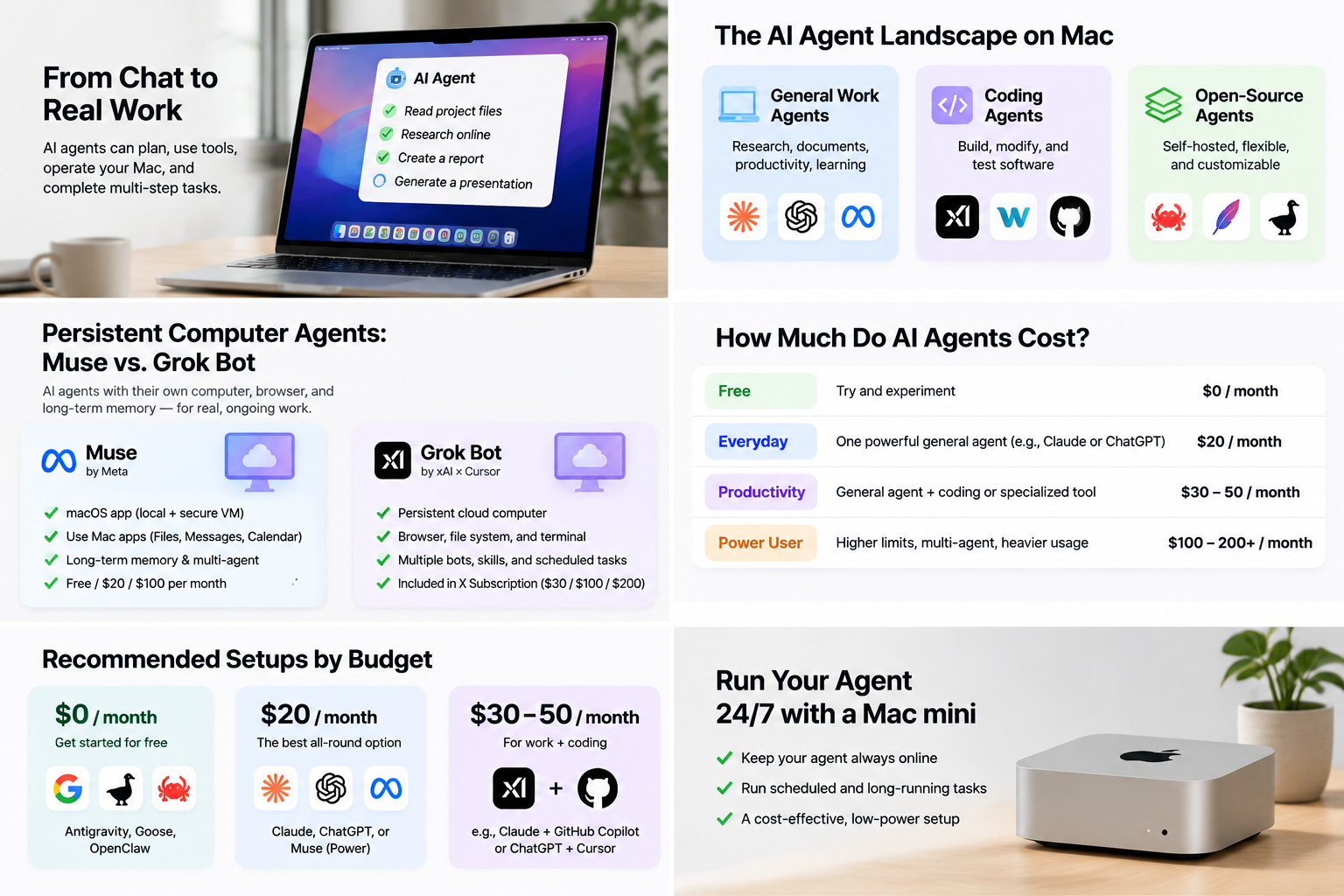
Instead of merely generating drafts, persistent computer agents receive access to a dedicated cloud environment with a browser, filesystem, and terminal. They keep working even after you shut your MacBook lid.
4. Grok Bot
Website: https://grok.com/ · Documentation: Grok Bot Docs
Grok Bot provides persistent AI teammates—Bots with names, roles, memory, and access to their own cloud computer. You can give one Bot a research role, another a monitoring role, and another an operations role, letting them collaborate in parallel.
What it can do
- Operate websites, browser sessions, and terminal commands autonomously.
- Maintain memory and context across sessions.
- Coordinate multiple Bots in parallel with automated task handoffs.
- Learn workflows from demonstrations and save them as reusable skills.
- Run routines on a schedule and continue working when your laptop is closed.
Pricing: The X Subscription
| Plan | Monthly price | Grok Bot Access |
|---|---|---|
| Free | $0 | Not included |
| Plus | $8 | Not included |
| Premium | $30 | Included (Shared Cursor/Grok allowance) |
| Super | $100 | Included (Larger pool) |
| Ultra | $200 | Included (Maximum allowance) |
Best for: Users who want persistent AI teammates that can operate websites, use a cloud computer, remember workflows, and coordinate tasks in parallel.
4. AI Coding Agents for Mac
Coding agents inspect repositories, plan changes across multiple files, run build commands, test results, and self-heal errors.
5. Cursor
Website: https://cursor.com/
Cursor is the benchmark AI-native code editor. It combines an IDE with local and cloud coding agents capable of multi-file Composer edits (⌘ Command + I), whole-codebase semantic indexing, and automatic terminal error diagnosis.
Pricing: Included in The X Subscription: Free ($0), Plus ($8), Premium ($30, includes cloud agents), Super ($100), Ultra ($200).
6. Windsurf
Website: https://windsurf.com/
Built around its Cascade agent (under Cognition), Windsurf understands project structure, writes multi-file modifications, and executes terminal tests through a guided agentic workflow.
| Plan | Monthly price |
|---|---|
| Free | $0 |
| Pro | $20 |
| Teams | $40 / seat |
| Max | $200 |
7. Devin
Website: https://devin.ai/
An autonomous software engineering agent built by Cognition to take on entire engineering tickets end-to-end, available in cloud sandboxes and through Devin Desktop: Free ($0), Pro ($20), Max ($200), Teams ($80 base + $40/developer seat).
8. Google Antigravity
Website: https://antigravity.google/
An agent-first development platform designed around coordinating multiple agents working on different project modules using Google Gemini models: Free Individual plan with weekly limits; Google AI Pro & Ultra for expanded compute.
9. GitHub Copilot
Website: https://github.com/features/copilot
Now supporting agent mode across IDEs and GitHub: Free ($0), Pro ($10/month, includes $15 AI credits), Pro+ ($39/month, includes $70 credits), and Max ($100/month, includes $200 credits).
5. Open-Source AI Agents for Mac
Open-source agents give you total ownership over your data, models, and infrastructure. The software is free, but you pay for model API tokens if using commercial providers.
10. OpenClaw
Website: https://openclaw.ai/ · Docs: OpenClaw Docs
Runs on your Mac or VPS and connects to messaging apps (Telegram, Discord, WhatsApp) to manage personal tasks, automate file processing, and execute background commands with persistent memory. (100% Free software + pay-per-token API).
11. Hermes Agent (Nous Research)
Website: https://hermes-agent.nousresearch.com/ · GitHub: hermes-agent
Features persistent memory and an experiential learning loop: creates reusable skills from solved tasks, remembers project nuances, and operates across messaging channels. Native macOS desktop app available (MIT licensed).
12. Goose (Block)
Website: https://block.github.io/goose/ · GitHub: goose
General-purpose open-source desktop agent connecting to external tools via the Model Context Protocol (MCP), supporting Anthropic, OpenAI, Google, Ollama, OpenRouter, and local models. (Apache 2.0 licensed).
13. OpenCode
Website: https://opencode.ai/ · GitHub: opencode
Open-source coding agent offering terminal CLI, desktop app, and IDE integration, providing total freedom across model providers and local weights. (MIT licensed).
6. Comparing All 13 AI Agents
| Product | Main Category | Starting Price | Key Differentiator |
|---|---|---|---|
| Claude | Work, research, coding | $20/month | Deep reasoning, Cowork and Claude Code |
| ChatGPT | Work, learning, coding | $20/month | Broad ecosystem, global shortcut, voice mode |
| Meta Muse | Personal and desktop agent | Free | Dedicated Muse Secure VM cloud computer |
| Grok Bot | Persistent computer agent | $30/month | Persistent cloud teammates in X Subscription |
| Cursor | AI coding IDE | $8/month | Composer multi-file autonomous coding engine |
| Windsurf | AI coding IDE | $20/month | Cascade agent integrated workflows |
| Devin | Autonomous engineering | $20/month | End-to-end software ticket delegation |
| Google Antigravity | Agent-first development | Free | Multi-agent programming with Gemini models |
| GitHub Copilot | Coding and GitHub automation | $10/month | Deep GitHub repo and PR integration |
| OpenClaw | Personal self-hosted agent | Free + model costs | Telegram/Discord companion gateway for Mac |
| Hermes Agent | Persistent open-source agent | Free + model costs | Persistent memory & reusable skill learning |
| Goose | General-purpose desktop agent | Free + model costs | Extensible MCP protocol tool connectivity |
| OpenCode | Open-source coding agent | Free + model costs | Terminal + GUI freedom across all providers |
7. What Does It Really Cost to Use AI Agents?
The subscription fee is only one part of the total cost. Depending on the product, you may also pay for API calls, extra compute credits, cloud hosting, or local hardware:
- Subscription fees: Commercial products charge $10 to $30/month for mainstream tiers (e.g. Claude Pro $20, ChatGPT Plus $20, X Subscription Premium $30).
- API costs: Open-source agents (OpenClaw, Hermes, Goose) do not charge for software, but complex multi-step tasks invoke dozens of model requests. A heavy research task can cost $2 to $10 in API tokens.
- Hosting costs: If you want an agent operating 24/7 without keeping your laptop awake, you need a small Linux VPS ($5–$20/month) or a dedicated local machine.
- Hardware costs: Most commercial agents run in the cloud, requiring zero local GPU power. If running local open-weight models (Ollama, Llama 3), a Mac with 32GB or 64GB Unified Memory is recommended.
8. Recommended Setups for Different Budgets
| Budget Tier | Monthly Cost | Recommended Toolchain |
|---|---|---|
| Budget 1: Free | $0 | Meta Muse Free + Google Antigravity Free + Goose / OpenCode (free model tiers) |
| Budget 2: Everyday Work | $20 | Choose one: Claude Pro ($20) or ChatGPT Plus ($20) |
| Budget 3: General + Coding | $30 | Claude Pro ($20) + GitHub Copilot ($10) OR The X Subscription Premium ($30, Cursor + Grok Bot) |
| Budget 4: Power User | $40–$50 | ChatGPT Plus ($20) + Cursor / Windsurf ($20–$30) |
| Budget 5: Heavy Pro | $100–$200+ | Claude Max / Ultra or ChatGPT Pro ($100–$200) + Devin Max ($200) |
| Budget 6: Self-Hosted | Free + API | OpenClaw / Hermes Agent + Anthropic or OpenRouter API keys |
9. Is a Mac Mini Worth Buying for AI Agents?
Using a Mac mini as a dedicated, always-on AI agent server is an increasingly practical setup. It stays powered on, connects to your local network, and allows background agents to monitor websites, summarize daily news, organize files, and run scheduled tasks without draining your laptop battery.
Note: Unless you are running 70B+ local LLMs on-device, you do not need an expensive Mac Studio. A base M2 or M4 Mac mini provides more than enough computing power to orchestrate multiple cloud-backed agents 24 hours a day.
10. Security: The Cost Nobody Talks About
Giving an AI agent access to your Mac filesystem, terminal, and browser is fundamentally different from asking questions in a chatbot. An agent with unrestricted permissions can delete files, leak private keys, or send unintended messages.
Essential Safety Rules:
- Start by granting access only to a dedicated sandbox folder rather than your entire disk.
- Require explicit confirmation before sending emails, executing destructive commands, or making purchases.
- Never expose master passwords or plain-text API keys in directories scanned by agents.
- Use isolated accounts for agents running continuously.
11. Final Verdict: Which AI Agent Should You Choose?
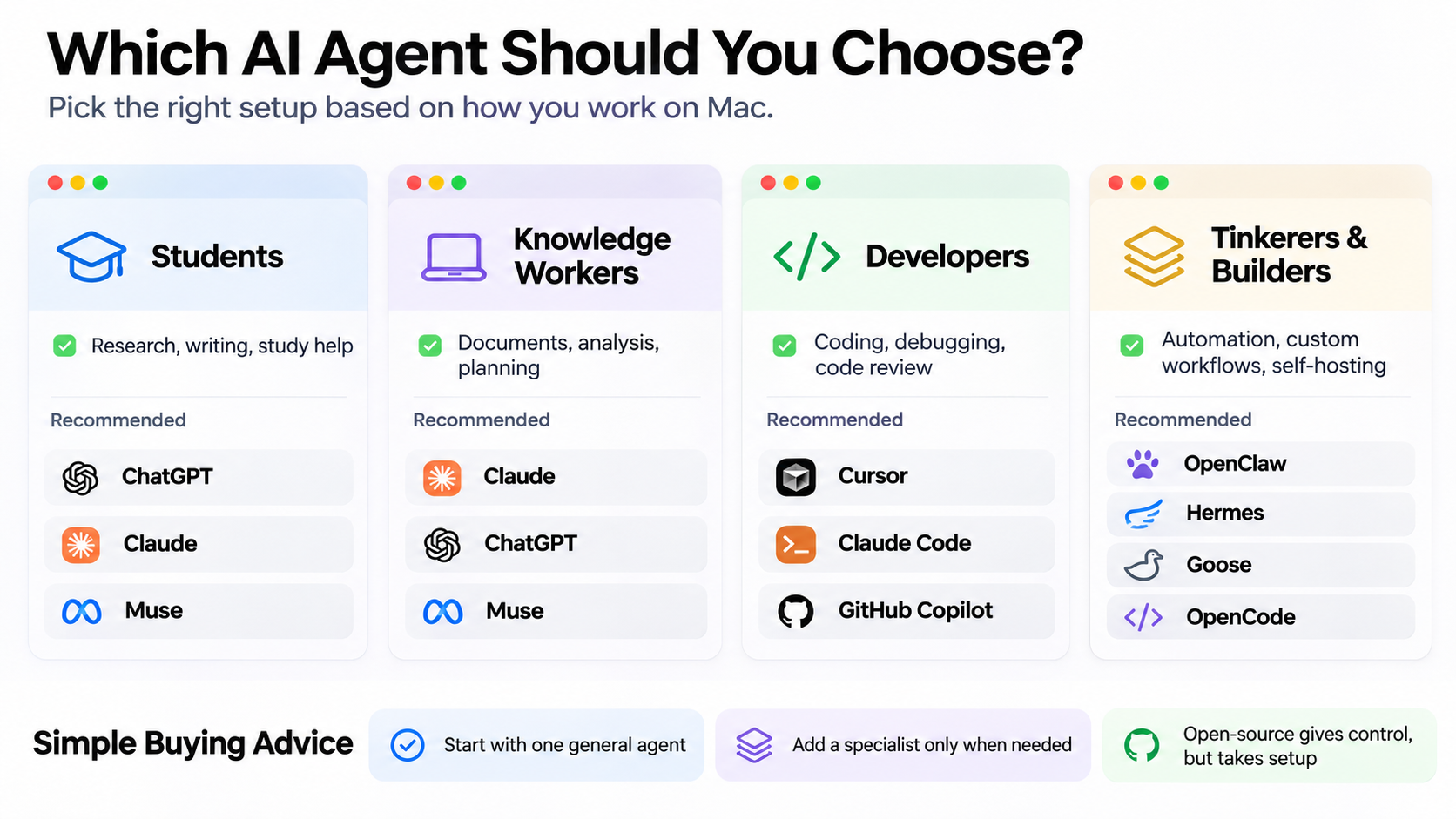
| User Profile | Top Recommended Products |
|---|---|
| Students & Academic Researchers | Claude (Pro), ChatGPT (Plus), Meta Muse |
| Writers, Editors & Analysts | Claude Cowork, ChatGPT Work, Muse |
| Professional Software Developers | Cursor (Composer), Claude Code, Devin |
| GitHub-Centric Teams | GitHub Copilot Pro / Max |
| Autonomous Background Teammates | Grok Bot (Persistent Cloud Computers) |
| Automation & Open-Source Geeks | OpenClaw, Hermes Agent, Goose |
| Always-On Personal Assistant | Meta Muse, OpenClaw (on Mac mini) |
The golden rule in 2026: Do not subscribe to five or six AI services simultaneously. Start with one solid general-purpose assistant (such as Claude Pro or ChatGPT Plus) and one specialized agent tailored to your primary work (such as Cursor for coding or Grok Bot for persistent cloud tasks). The Mac is already the premier hardware platform for autonomous AI—getting started costs no more than a single subscription, and in many cases, can be done completely free.
Community & Reviews
0No reviews yet for The Best AI Agents for Mac in 2026: What They Can Do and What They Cost. Be the first to share your installation or compatibility experience!
Leave a Review
Share tips, architecture compatibility (Intel / Apple Silicon), or help others troubleshoot.
Only registered members can post reviews and installation notes.